# second-floor 下拉二楼组件
## 注意
该组件为 v3.2.3 之后添加的!!!
## 介绍
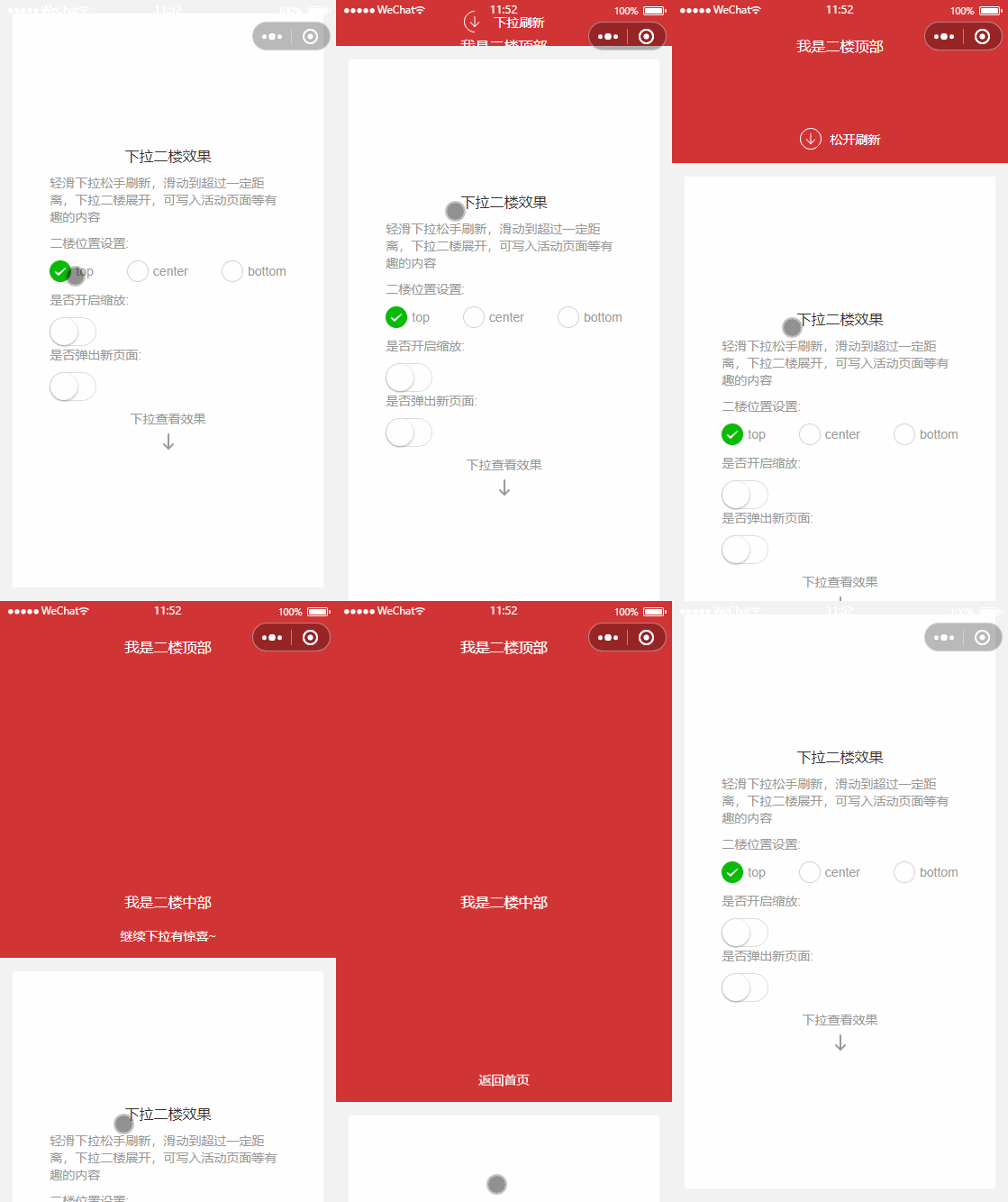
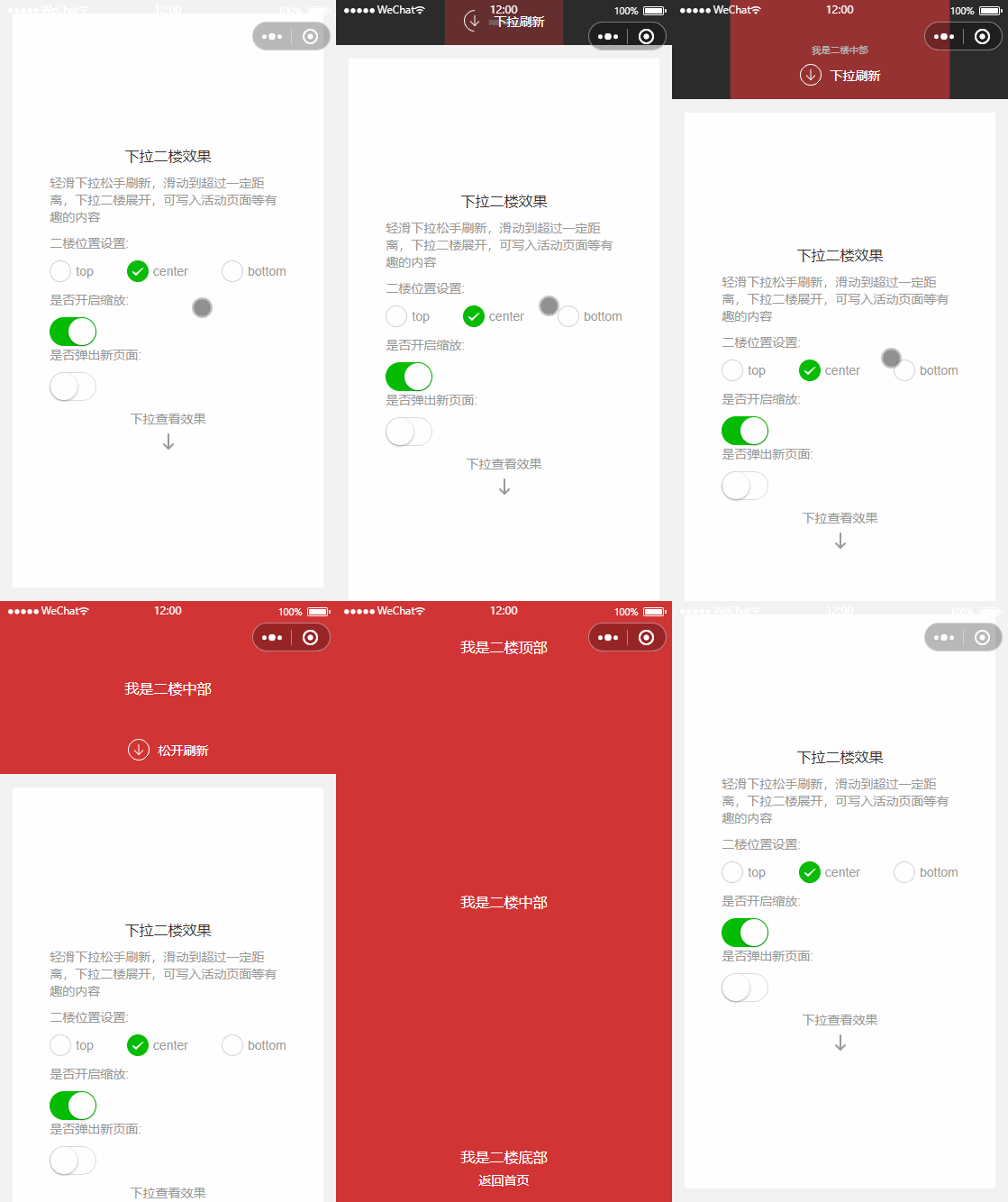
很多 app 首页都带有下拉二楼的功能,拖拽屏幕向下松手刷新页面,但是继续向下拉动就会完整的拉下来一屏的内容,如下图:
 second-floor 组件可搭配 second-floor-refresh 来实现下拉二楼的效果
## 引入
在`app.json`或`index.json`中引入组件
```json
"usingComponents": {
"second-floor": "coolui-scroller/second-floor/index",
"second-floor-refresh": "coolui-scroller/second-floor-refresh/index",
}
```
## 代码演示
### 1. 基础使用
搭配 second-floor-refresh 组件实现文字提示,同时也提供了插槽位置支持您自定义,自定义 refresh 组件请参考 second-floor-refresh 内部的写法
`setText` 是关键方法
::: code-group
```html [index.wxml]
二楼区域
页面主内容
```
```js [index.js]
Page({
data: {
val: 0, // 拖拽的进度值
},
onRefresh() {
// 下拉刷新时执行
},
onSecondShow() {
// 下拉二楼展开之后执行
},
onSecondBack() {
// 下拉二楼关闭之后执行
},
})
```
:::
### 2. 可搭配 page-container
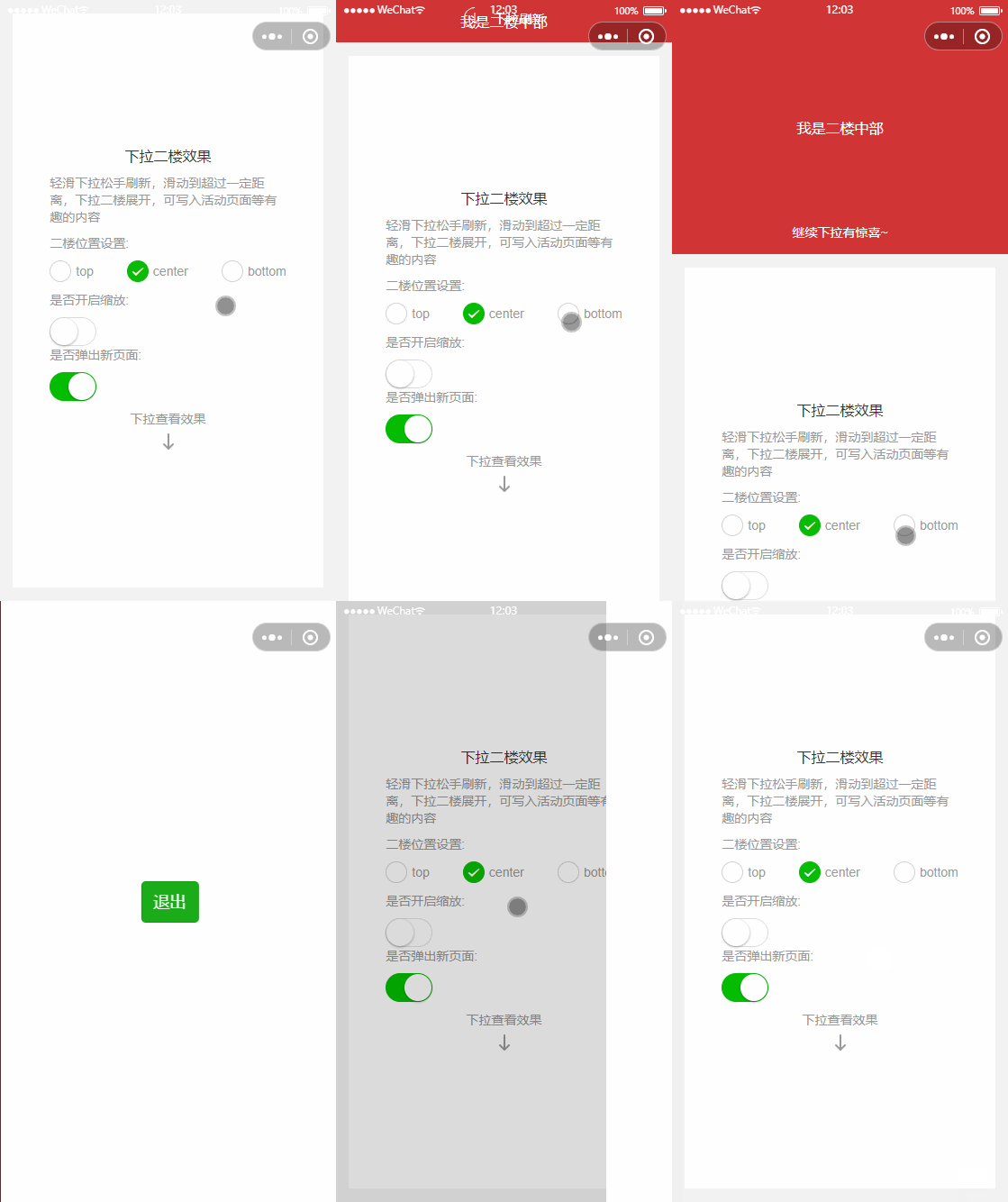
很多 app 的下拉二楼效果是下拉之后打开一个新页,搭配 page-container, 在 onSecondShow 方法中控制 page-container 的 show 可以实现,然后利用组件的 back 事件进行关闭
second-floor 组件可搭配 second-floor-refresh 来实现下拉二楼的效果
## 引入
在`app.json`或`index.json`中引入组件
```json
"usingComponents": {
"second-floor": "coolui-scroller/second-floor/index",
"second-floor-refresh": "coolui-scroller/second-floor-refresh/index",
}
```
## 代码演示
### 1. 基础使用
搭配 second-floor-refresh 组件实现文字提示,同时也提供了插槽位置支持您自定义,自定义 refresh 组件请参考 second-floor-refresh 内部的写法
`setText` 是关键方法
::: code-group
```html [index.wxml]
二楼区域
页面主内容
```
```js [index.js]
Page({
data: {
val: 0, // 拖拽的进度值
},
onRefresh() {
// 下拉刷新时执行
},
onSecondShow() {
// 下拉二楼展开之后执行
},
onSecondBack() {
// 下拉二楼关闭之后执行
},
})
```
:::
### 2. 可搭配 page-container
很多 app 的下拉二楼效果是下拉之后打开一个新页,搭配 page-container, 在 onSecondShow 方法中控制 page-container 的 show 可以实现,然后利用组件的 back 事件进行关闭
 ::: code-group
```html [index.wxml]
二楼区域
下拉二楼
页面主内容
```
```js [index.js]
Page({
data: {
val: 0, // 拖拽的进度值
show: false,
duration: 300,
position: 'right',
round: false,
overlay: true,
customStyle: '',
overlayStyle: '',
},
onRefresh() {
// 下拉刷新时执行
},
onSecondShow() {
// 下拉二楼展开之后执行
setTimeout(() => {
this.setData({
show: true,
})
}, 500)
},
onSecondBack() {
// 下拉二楼关闭之后执行
},
exit() {
const secondFloor = this.selectComponent('.my-second-floor')
secondFloor.back().then(() => {
this.setData({ show: false })
})
},
})
```
:::
### 3. 可设置下拉二楼的位置
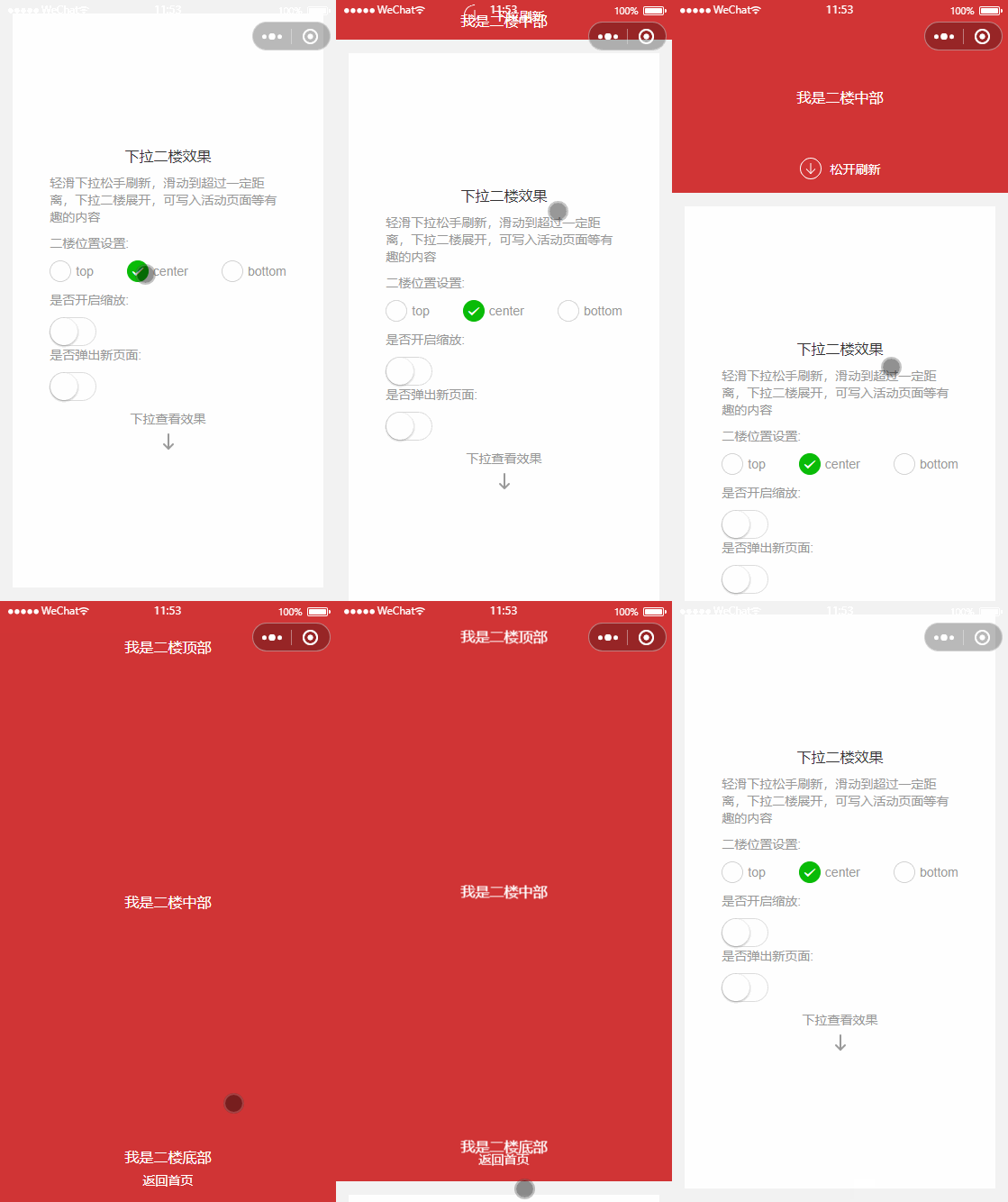
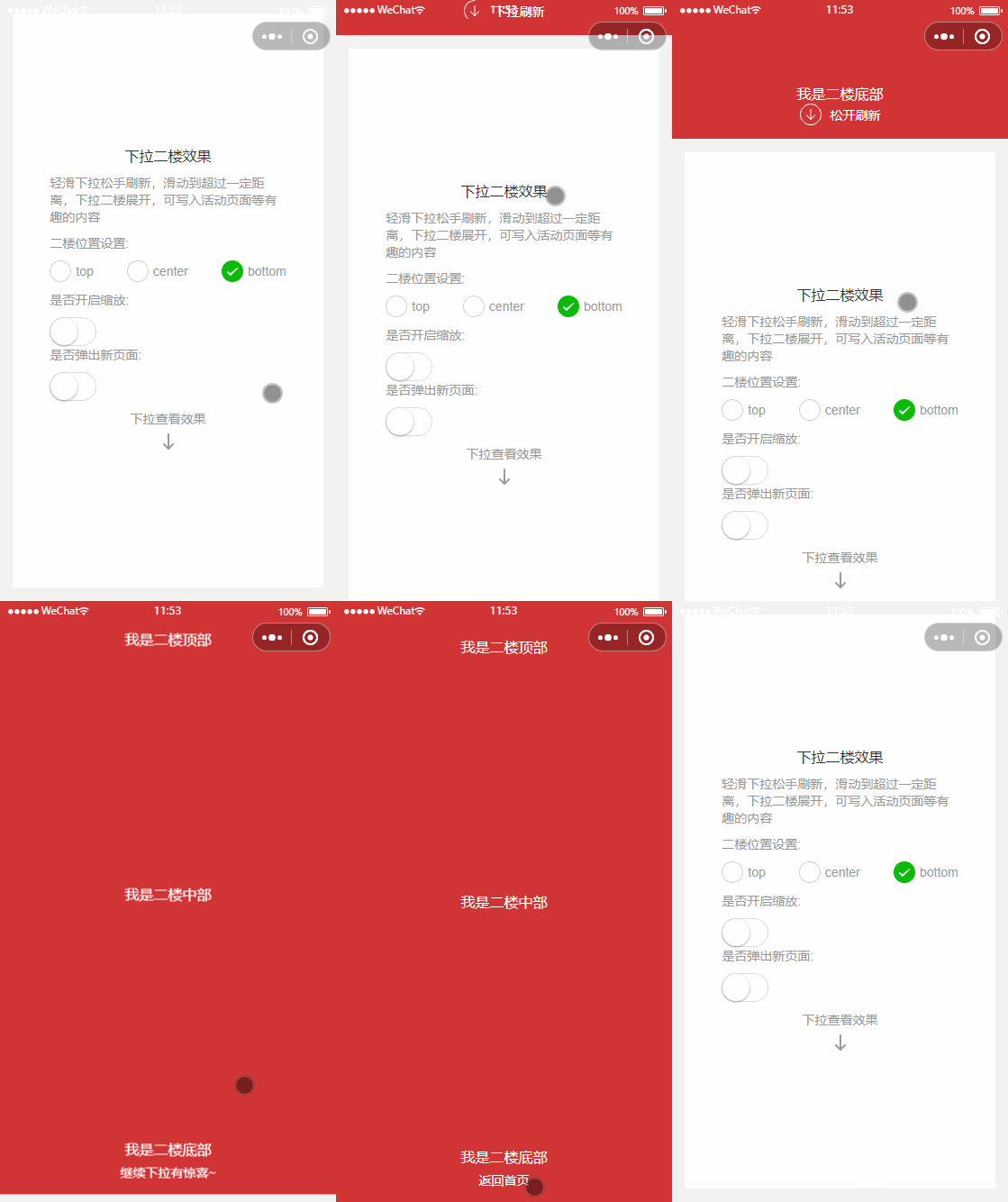
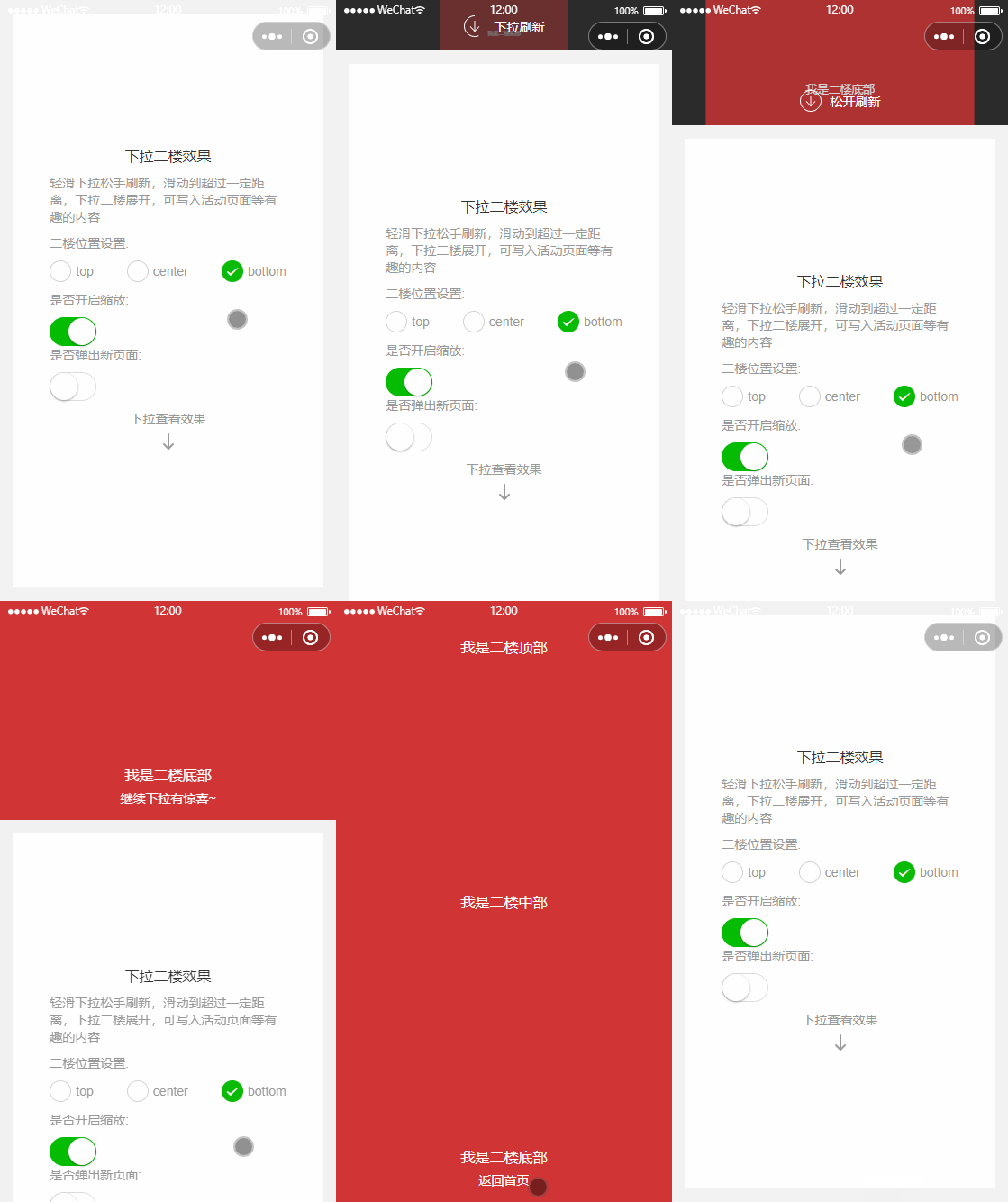
可设置下拉二楼的位置 top、center、bottom。即展开的时候先展示的是二楼的哪个部位
```html
```
### 4. 可设置下拉二楼是否开启缩放动画
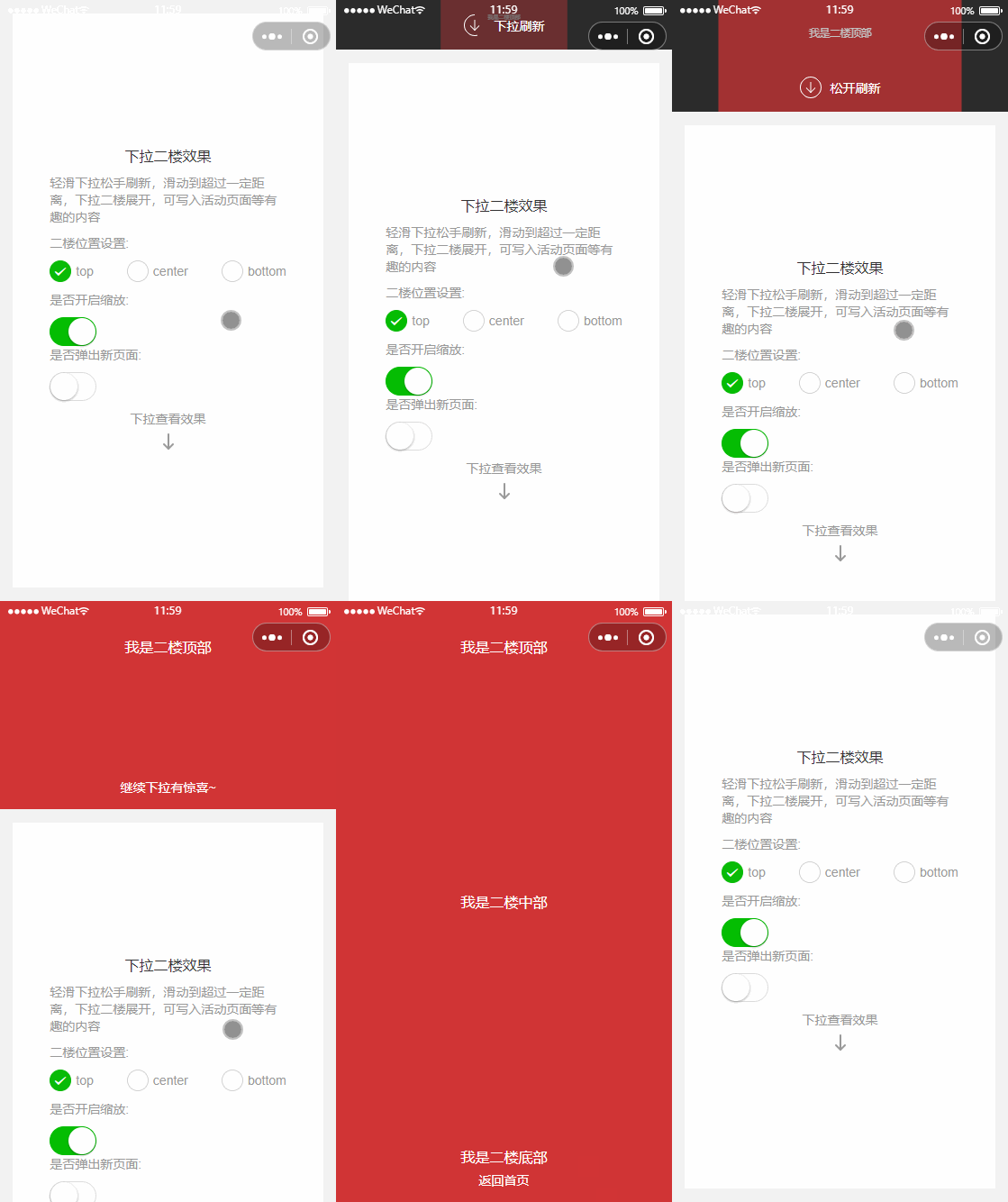
就如同微信首页下拉出来小程序列表一样,二楼展开会有一个缩放的效果
```html
```
### 5. 可搭配 nav-bar 设置顶部标题栏
::: code-group
```html [index.wxml]
下拉二楼
```
```js [index.js]
Page({
data: {
navBarConfig: {
back: {
show: true, // 是否显示返回按钮
click: () => {
// 返回按钮点击方法
wx.navigateBack({
delta: 1,
})
},
},
background: {
color: '#d13435', //设置背景颜色
},
text: {
color: '#fff', // 设置文字颜色
},
},
},
})
```
:::
### 6. 可设置 tip 参数 控制进入页面初始化时,自动下拉回弹,提示用户有下拉二楼
::: code-group
```html [index.wxml]
```
```js [index.js]
Page({
data: {
tip: {
show: true, // 开启tip 自动下拉提示
height: 100, // 自动下拉的高度
times: 1, // 自动下拉的次数
duration: 2000, // 自动下拉的速度
},
},
})
```
:::
## second-floor 配置
| 参数 | 说明 | 类型 | 默认值 | 版本 |
| ------ | -------------------- | --------- | ----------------------------------- | ----- |
| top | 二楼初始位置 | _Boolean_ | false | 3.2.3 |
| center | 二楼初始位置 | _Boolean_ | false | 3.2.3 |
| bottom | 二楼初始位置 | _Boolean_ | true | 3.2.3 |
| scale | 二楼是否开启缩放动画 | _Boolean_ | false | 3.2.3 |
| tip | 二楼提示动画 | _Object_ | 详见[tip 设置](./floor.md#tip-设置) | 3.3.1 |
## tip 设置
| 参数 | 说明 | 类型 | 默认值 | 版本 |
| -------- | ----------------------------- | --------- | ------ | ----- |
| show | 二楼 tip 动画是否开启 | _Boolean_ | false | 3.3.1 |
| height | 二楼 tip 动画自动下拉高度 | _Number_ | 100 | 3.3.1 |
| times | 二楼 tip 动画自动下拉次数 | _Number_ | 1 | 3.3.1 |
| duration | 二楼 tip 动画自动下拉速度控制 | _Number_ | 2000 | 3.3.1 |
## 插槽
| 名称 | 说明 | 可用组件 |
| -------------------- | ---------------- | ---------------------- |
| second-floor | 二楼插槽区域 | - |
| second-floor-refresh | 下拉刷新插槽位置 | `second-floor-refresh` |
| nav-bar | 顶部标题栏 | `nav-bar` |
## methods 方法
| 名称 | 用法 | 说明 | 版本 |
| ------------ | ------------------------------------------------------------------------------------------------------------------------------------- | ------------------------------------------------------------ | ----- |
| settriggered | 先获取组件实例:
::: code-group
```html [index.wxml]
二楼区域
下拉二楼
页面主内容
```
```js [index.js]
Page({
data: {
val: 0, // 拖拽的进度值
show: false,
duration: 300,
position: 'right',
round: false,
overlay: true,
customStyle: '',
overlayStyle: '',
},
onRefresh() {
// 下拉刷新时执行
},
onSecondShow() {
// 下拉二楼展开之后执行
setTimeout(() => {
this.setData({
show: true,
})
}, 500)
},
onSecondBack() {
// 下拉二楼关闭之后执行
},
exit() {
const secondFloor = this.selectComponent('.my-second-floor')
secondFloor.back().then(() => {
this.setData({ show: false })
})
},
})
```
:::
### 3. 可设置下拉二楼的位置
可设置下拉二楼的位置 top、center、bottom。即展开的时候先展示的是二楼的哪个部位
```html
```
### 4. 可设置下拉二楼是否开启缩放动画
就如同微信首页下拉出来小程序列表一样,二楼展开会有一个缩放的效果
```html
```
### 5. 可搭配 nav-bar 设置顶部标题栏
::: code-group
```html [index.wxml]
下拉二楼
```
```js [index.js]
Page({
data: {
navBarConfig: {
back: {
show: true, // 是否显示返回按钮
click: () => {
// 返回按钮点击方法
wx.navigateBack({
delta: 1,
})
},
},
background: {
color: '#d13435', //设置背景颜色
},
text: {
color: '#fff', // 设置文字颜色
},
},
},
})
```
:::
### 6. 可设置 tip 参数 控制进入页面初始化时,自动下拉回弹,提示用户有下拉二楼
::: code-group
```html [index.wxml]
```
```js [index.js]
Page({
data: {
tip: {
show: true, // 开启tip 自动下拉提示
height: 100, // 自动下拉的高度
times: 1, // 自动下拉的次数
duration: 2000, // 自动下拉的速度
},
},
})
```
:::
## second-floor 配置
| 参数 | 说明 | 类型 | 默认值 | 版本 |
| ------ | -------------------- | --------- | ----------------------------------- | ----- |
| top | 二楼初始位置 | _Boolean_ | false | 3.2.3 |
| center | 二楼初始位置 | _Boolean_ | false | 3.2.3 |
| bottom | 二楼初始位置 | _Boolean_ | true | 3.2.3 |
| scale | 二楼是否开启缩放动画 | _Boolean_ | false | 3.2.3 |
| tip | 二楼提示动画 | _Object_ | 详见[tip 设置](./floor.md#tip-设置) | 3.3.1 |
## tip 设置
| 参数 | 说明 | 类型 | 默认值 | 版本 |
| -------- | ----------------------------- | --------- | ------ | ----- |
| show | 二楼 tip 动画是否开启 | _Boolean_ | false | 3.3.1 |
| height | 二楼 tip 动画自动下拉高度 | _Number_ | 100 | 3.3.1 |
| times | 二楼 tip 动画自动下拉次数 | _Number_ | 1 | 3.3.1 |
| duration | 二楼 tip 动画自动下拉速度控制 | _Number_ | 2000 | 3.3.1 |
## 插槽
| 名称 | 说明 | 可用组件 |
| -------------------- | ---------------- | ---------------------- |
| second-floor | 二楼插槽区域 | - |
| second-floor-refresh | 下拉刷新插槽位置 | `second-floor-refresh` |
| nav-bar | 顶部标题栏 | `nav-bar` |
## methods 方法
| 名称 | 用法 | 说明 | 版本 |
| ------------ | ------------------------------------------------------------------------------------------------------------------------------------- | ------------------------------------------------------------ | ----- |
| settriggered | 先获取组件实例:
`const secondFloor = this.selectComponent('.my-second-floor');`, 然后调用方法:
`secondFloor.settriggered()` | 关闭刷新的方法,在 onRefresh 中,数据刷新之后执行,返回 Promise | 3.2.3 |
| back | 先获取组件实例:
`const secondFloor = this.selectComponent('.my-second-floor');`, 然后调用方法:
`secondFloor.back()` | 关闭二楼的方法,会触发 onSecondBack, 返回 Promise | 3.2.3 |
## events 事件
| 名称 | 用法 | 说明 | 版本 |
| ---------- | ----------------- | ----------------------------------------------------------- | ----- |
| refresh | `bind:refresh` | 刷新时执行,可执行请求数据,然后执行 `settriggered` 关闭刷新 | 3.2.3 |
| secondShow | `bind:secondShow` | 二楼打开之后执行 | 3.2.3 |
| secondBack | `bind:secondBack` | 二楼关闭之后执行 | 3.2.3 |
## second-floor-refresh 配置
| 参数 | 说明 | 类型 | 默认值 | 版本 |
| ------------- | ----------------------------------------------------------------------------- | -------- | --------------------------------------------------------------------------------------------------------------------------------------------- | ----- |
| refreshConfig | second-floor-refresh 组件的设置,详见[refreshConfig](./floor.md#refreshConfig) | _Object_ | `{ downText: "下拉刷新", loadingText: "正在加载", backText: "返回首页", tipText: "松开刷新", moreText: "继续下拉有惊喜~", color: "#ffffff" }` | 3.2.3 |
## refreshConfig
| 参数 | 说明 | 类型 | 默认值 | 版本 |
| ----------- | ------------------------------ | --------- | ------ | ----- |
| downText | 开始下拉时的文字 | _Boolean_ | false | 3.2.3 |
| loadingText | 正在加载时的文字 | _Boolean_ | false | 3.2.3 |
| backText | 二楼加载成功之后返回按钮的文字 | _Boolean_ | false | 3.2.3 |
| tipText | 松开刷新时的提示文字 | _Boolean_ | false | 3.2.3 |
| moreText | 继续下拉的提示文字 | _Boolean_ | false | 3.2.3 |
| color | 文字颜色 | _Boolean_ | false | 3.2.3 |